
Limited-Time 30% OFF!Get Offer
FLUX 3 Image is live — true-to-life stills, free to start

FLUX 3 Image True-to-life stills in every style

Text to image and image to image on the FLUX 3 Image generator. Try free with signup credits — no card required.

FLUX 3 Image is the stills side of FLUX 3: sharp subjects, natural light, and styles that stay consistent from draft to finish. Write a plain brief or upload a photo and say what to change. Generate on flux3.video and keep every winner in your library.

  • True-to-life detail — faces, products, and materials that hold up
  • Many styles from one model — photo, design, and campaign looks
  • Text to image and image to image in the same workspace
  • 1K for ideas; 2K or 4K when a still is worth finishing
  • Free trial with signup credits — start without a card
  • Need motion next? Open FLUX 3 video on /video
FLUX 3 Image product hero — left soft type, right gold-edged porcelain flower sculpture
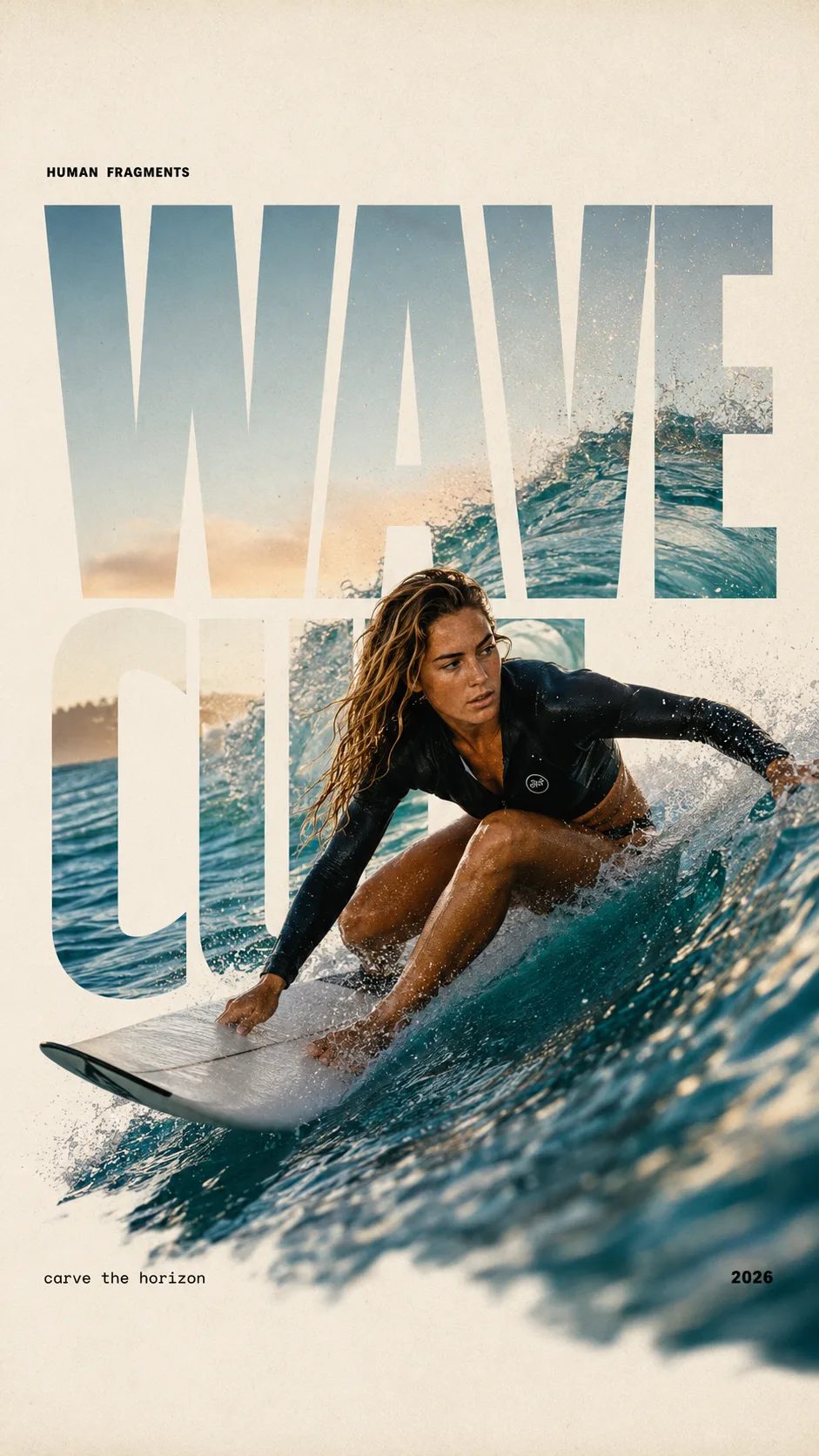
HUMAN FRAGMENTS editorial poster sample

Create a 9:16 editorial poster in the HUMAN FRAGMENTS visual system. Theme: [surfing / basketball / boxing / cake decorating] Subject: [gender, age, appearance, outfit] Action: [specific movement or handcraft] Scene: [location and environment] Title: [custom two-word title] Supporting line: [one short phrase] Year: 2026 Use oversized cropped typography as the main structural framework. The letters should act as windows that reveal the surrounding environment, while the main person remains visually complete in front of the type. Do not let the letters cut through the face, torso, arms, thighs, or other important parts of the body. Let one key action element break beyond the typography to create strong depth: 1. WAVE CUT — a surfer carving across a rising wave, with the board nose, hand, water spray, and curled wave breaking outside the letters. 2. RIM RISE — a basketball player reaching toward the hoop from a camera placed above the rim, with the basketball, hand, and hoop fully outside the letter masks and aligned naturally. 3. IMPACT FRAME — a boxer throwing a straight punch toward the camera, with the foreground glove enlarged and breaking beyond the typography while the gym remains inside the letters. 4. SOFT SWIRL — a graceful young woman decorating a cake, with the piping bag, hands, cake, and cream details extending beyond the letters while the bakery interior appears inside the type. Use realistic photography, believable anatomy, natural skin texture, strong foreground perspective, subtle paper grain, a warm off-white background, restrained colors, and clean editorial spacing. Keep the text minimal and freely placed: [Title] HUMAN FRAGMENTS [Short supporting line] 2026

Create a 9:16 editorial poster in the HUMAN FRAGMENTS visual system. Theme: [surfing / basketball / boxing / cake decorating] Subject: [gender, age, appearance, outfit] Action: [specific movement or handcraft] Scene: [location and environment] Title: [custom two-word title] Supporting line: [one short phrase] Year: 2026 Use oversized cropped typography as the main structural framework. The letters should act as windows that reveal the surrounding environment, while the main person remains visually complete in front of the type. Do not let the letters cut through the face, torso, arms, thighs, or other important parts of the body. Let one key action element break beyond the typography to create strong depth: 1. WAVE CUT — a surfer carving across a rising wave, with the board nose, hand, water spray, and curled wave breaking outside the letters. 2. RIM RISE — a basketball player reaching toward the hoop from a camera placed above the rim, with the basketball, hand, and hoop fully outside the letter masks and aligned naturally. 3. IMPACT FRAME — a boxer throwing a straight punch toward the camera, with the foreground glove enlarged and breaking beyond the typography while the gym remains inside the letters. 4. SOFT SWIRL — a graceful young woman decorating a cake, with the piping bag, hands, cake, and cream details extending beyond the letters while the bakery interior appears inside the type. Use realistic photography, believable anatomy, natural skin texture, strong foreground perspective, subtle paper grain, a warm off-white background, restrained colors, and clean editorial spacing. Keep the text minimal and freely placed: [Title] HUMAN FRAGMENTS [Short supporting line] 2026

Why creators open FLUX 3 Image

The FLUX 3 stills model for photos that feel real — and edits that keep the good parts.

FLUX 3 Image is built for the jobs that need a finished still, not a clip. Text to image turns a short description into a full scene. Image to image keeps the subject you already like while you change light, wardrobe, or background. Signup credits cover a free first run at the default size so you can judge the look on your brief, not a demo slideshow.

Image to image edits

FLUX 3 Image keeps the scene while you change one thing

Upload a still, name only the edit, and try the result in the generator — prompt and image handoff included.

Red jacket → black

Same cafe pair with left jacket black

Original

Two friends at a cafe, left person in red jacket

Edit prompt

Keep both people, faces, poses, table, and lighting. Change only the left person's jacket to black. Right outfit unchanged. Photoreal group still.

Copy a FLUX 3 Image brief

Three FLUX 3 Image prompts you can run next

Paste into the generator — product, poster, and lifestyle stills that show multi-style control.

Studio mug packshot sample for FLUX 3 Image text to image
Sample still

Example prompt

Studio product packshot

Studio product photo of a matte ceramic coffee mug on pale wood, soft window light from the left, gentle shadow, clean minimal background, sharp edges, commercial packshot, high detail.

Job Product still Mode Text to image
Use this prompt
OPEN NIGHT poster sample for FLUX 3 Image
Sample still

Example prompt

Poster with readable title type

Vertical event poster, bold centered title text saying OPEN NIGHT in large readable sans-serif, deep indigo background, soft gold spotlight, simple star icon under the title, generous margins, print-ready layout.

Job Poster still Mode Text to image
Use this prompt
Golden hour lifestyle still sample for FLUX 3 Image
Sample still

Example prompt

Lifestyle cover photo

Outdoor lifestyle photo of a young adult in a rust jacket on a city sidewalk at golden hour, natural skin texture, shallow depth of field, candid magazine cover energy, photoreal, no logo text in the image.

Job Lifestyle still Mode Text to image
Use this prompt

FLUX 3 Image strengths

What makes FLUX 3 Image worth opening first

Four reasons teams use this stills path when the file has to look real and on-brand.

True-to-life subjects that hold detail

FLUX 3 Image is tuned for stills that feel observed, not plastic. Skin, fabric, packaging, and street light stay readable so a first pass can go into a mood board without a heavy retouch pass. That true-to-life look is why people search FLUX 3 Image for product and portrait work.

Photoreal portrait still proving FLUX 3 Image true-to-life detail

Many styles without switching models

Photo, graphic, and campaign looks live in one FLUX 3 Image generator. Change the brief — not the account — when you need a clean packshot in the morning and a bolder social still after lunch. Multi-style control is part of the FLUX 3 Image promise, not a separate product hop.

Graphic poster still proving multi-style FLUX 3 Image

Image to image that keeps what already works

Upload a reference and name only the change — background, colorway, crop feel, or wardrobe. FLUX 3 Image image to image is built for local edits so you do not rebuild a good composition from a blank prompt every time.

Product packshot still for image to image edits

Finish winners at 2K or 4K

Explore at 1K while the idea is moving, then re-run the same FLUX 3 Image prompt at 2K or 4K when composition is locked. Size is a clear choice before generate, so finishing a hero still stays predictable.

Ultra-detailed perfume still for 2K/4K finish story
Quick start

Try FLUX 3 Image free in four steps

From signup credits to a downloadable still on flux3.video.

  1. 1

    Create an account and claim signup credits

    New accounts get free credits you can spend on FLUX 3 Image. No card is required to start the free trial.

  2. 2

    Write a prompt or upload a photo

    Describe the still in plain language, or drop a reference and name only the change for image to image.

  3. 3

    Pick size and generate

    Use 1K while you explore. When an image works, re-run the same FLUX 3 Image brief at 2K or 4K.

  4. 4

    Save and reuse

    Keep winners in your library. Tweak with another edit, or open /video when the same idea needs motion with FLUX 3.

Who ships stills here

Jobs where FLUX 3 Image shines

Still-first work — posters, catalogs, covers, and edit loops.

  • Product and catalog teams

    Draft packshots and colorways with FLUX 3 Image before a full photo day. True-to-life materials help reviews move faster.

  • Poster and social designers

    Try layout and title ideas as stills you can export, then only finish the boards that land.

  • Marketers testing creative

    Spin campaign stills free with signup credits, then pay to finish winners larger.

  • Creators who animate later

    Lock a hero still on FLUX 3 Image, then open FLUX 3 on /video when the ad needs motion.

  • Editors with a good source photo

    Image to image keeps the subject while you change background or wardrobe without starting over.

  • Agencies and freelancers

    Show clients still options in the same call, then scale volume when a direction sticks.

Still vs motion

FLUX 3 Image vs FLUX 3 video

One FLUX 3 family on this site. Pick the path that matches the file you need today.

This page FLUX 3 Image Stills & edits Stay on image
Video path FLUX 3 Short video Open video
Best first use True-to-life stills, posters, and photo edits Short clips for posts, demos, and product motion
Main inputs Text prompt or reference image Text prompt or start photo
Output Still image at 1K / 2K / 4K Short video at 720p / 1080p / 4K
Free start Signup credits for a first FLUX 3 Image run Signup credits to start exploring FLUX 3 video
Where to open /image — FLUX 3 Image /video — FLUX 3

More image models in the picker

FLUX 3 Image is the house default — browse siblings when you want a different look.

Creators on FLUX 3 Image

What people make with FLUX 3 Image

Product boards, posters, and photo edits that need true-to-life stills.

“Materials finally looked real.”

FLUX 3 Image gave us mug and bottle stills that survived a design review without a full reshoot.

A
Ava L.
DTC product designer

“Poster type stayed readable.”

I tried three FLUX 3 Image poster directions before lunch and kept the one with clean title type.

M
Marcus T.
Social designer

“Edit kept the face I liked.”

Image to image on FLUX 3 Image let me swap only the background. I did not rebuild the portrait from zero.

R
Rina K.
Freelance retoucher

“Stills first, video later.”

We approve the FLUX 3 Image still here, then animate the winner with FLUX 3 on /video.

T
Theo W.
Growth marketer

FLUX 3 Image — practical answers

Can I try FLUX 3 Image free?

Yes. New accounts get signup credits you can spend on FLUX 3 Image. Start at the default size with no card required, then upgrade when you need more volume or larger finishes.

What is special about FLUX 3 Image?

FLUX 3 Image is the stills model in the FLUX 3 family — true-to-life detail, multi-style control, and both text to image and image to image in one browser workspace on flux3.video.

Does FLUX 3 Image support text to image and image to image?

Yes. Text to image starts from a prompt. Image to image starts from an upload plus an edit instruction. Both live in the generator on this page.

What resolutions can I pick?

1K, 2K, and 4K. Explore at 1K, then re-run winners larger when composition is locked.

When should I use FLUX 3 video instead?

When you need a short motion clip. Keep FLUX 3 Image for stills and edits; open FLUX 3 on /video for text to video or image to video.

Can I use outputs commercially?

Commercial licensing is available on paid plans. Check the legal pages for exact terms before client or ad use.

What happens if a run fails?

Failed generations refund credits automatically. You only keep the spend for outputs that complete.

Do I generate on this site or somewhere else?

Generate here on flux3.video. Sign up once, run FLUX 3 Image in the browser, and keep results in your library — no extra detour to finish a still.

Make your next still with FLUX 3 Image

True-to-life stills, free trial with signup credits, text to image and image to image — all on flux3.video.