
限時 7 折優惠!領取優惠
FLUX 3 Image 已上線——真實感靜圖,免費就能開始

FLUX 3 Image 各種風格的真實感靜圖

在 FLUX 3 Image 生成器做文生圖與圖生圖。用註冊積分免費試用——不必綁卡。

FLUX 3 Image 是 FLUX 3 的靜圖一側:主體清晰、光線自然,風格從草稿到定稿都站得住。用白話寫需求,或上傳照片並說明要改什麼。在 flux3.video 生成,把喜歡的結果都留在媒體庫。

  • 真實感細節——臉、產品與材質都經得起看
  • 一個模型多種風格——攝影、設計與活動視覺
  • 文生圖與圖生圖,同一工作區完成
  • 構思用 1K;值得定稿時再上 2K 或 4K
  • 註冊積分免費試用——上手不必綁卡
  • 下一步要動態?到 /video 開 FLUX 3 影片
以 FLUX 3 Image 生成的真實感街頭靜圖
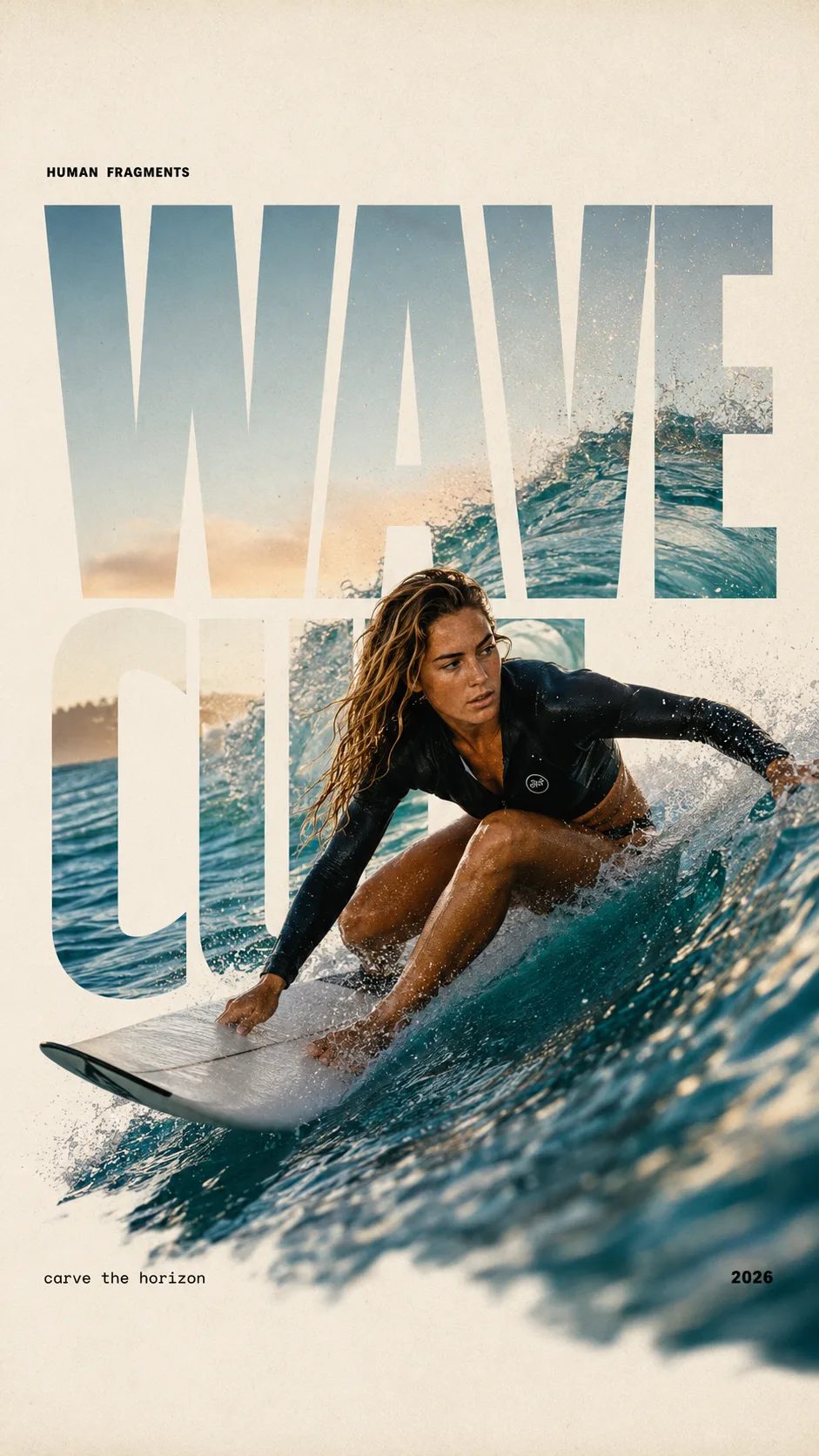
HUMAN FRAGMENTS editorial poster sample

Create a 9:16 editorial poster in the HUMAN FRAGMENTS visual system. Theme: [surfing / basketball / boxing / cake decorating] Subject: [gender, age, appearance, outfit] Action: [specific movement or handcraft] Scene: [location and environment] Title: [custom two-word title] Supporting line: [one short phrase] Year: 2026 Use oversized cropped typography as the main structural framework. The letters should act as windows that reveal the surrounding environment, while the main person remains visually complete in front of the type. Do not let the letters cut through the face, torso, arms, thighs, or other important parts of the body. Let one key action element break beyond the typography to create strong depth: 1. WAVE CUT — a surfer carving across a rising wave, with the board nose, hand, water spray, and curled wave breaking outside the letters. 2. RIM RISE — a basketball player reaching toward the hoop from a camera placed above the rim, with the basketball, hand, and hoop fully outside the letter masks and aligned naturally. 3. IMPACT FRAME — a boxer throwing a straight punch toward the camera, with the foreground glove enlarged and breaking beyond the typography while the gym remains inside the letters. 4. SOFT SWIRL — a graceful young woman decorating a cake, with the piping bag, hands, cake, and cream details extending beyond the letters while the bakery interior appears inside the type. Use realistic photography, believable anatomy, natural skin texture, strong foreground perspective, subtle paper grain, a warm off-white background, restrained colors, and clean editorial spacing. Keep the text minimal and freely placed: [Title] HUMAN FRAGMENTS [Short supporting line] 2026

Create a 9:16 editorial poster in the HUMAN FRAGMENTS visual system. Theme: [surfing / basketball / boxing / cake decorating] Subject: [gender, age, appearance, outfit] Action: [specific movement or handcraft] Scene: [location and environment] Title: [custom two-word title] Supporting line: [one short phrase] Year: 2026 Use oversized cropped typography as the main structural framework. The letters should act as windows that reveal the surrounding environment, while the main person remains visually complete in front of the type. Do not let the letters cut through the face, torso, arms, thighs, or other important parts of the body. Let one key action element break beyond the typography to create strong depth: 1. WAVE CUT — a surfer carving across a rising wave, with the board nose, hand, water spray, and curled wave breaking outside the letters. 2. RIM RISE — a basketball player reaching toward the hoop from a camera placed above the rim, with the basketball, hand, and hoop fully outside the letter masks and aligned naturally. 3. IMPACT FRAME — a boxer throwing a straight punch toward the camera, with the foreground glove enlarged and breaking beyond the typography while the gym remains inside the letters. 4. SOFT SWIRL — a graceful young woman decorating a cake, with the piping bag, hands, cake, and cream details extending beyond the letters while the bakery interior appears inside the type. Use realistic photography, believable anatomy, natural skin texture, strong foreground perspective, subtle paper grain, a warm off-white background, restrained colors, and clean editorial spacing. Keep the text minimal and freely placed: [Title] HUMAN FRAGMENTS [Short supporting line] 2026

創作者為什麼會打開 FLUX 3 Image

FLUX 3 的靜圖模型:做出有真實感的照片,修圖時也留住好的部分。

FLUX 3 Image 為需要完成靜圖、而不是短片的工作而做。文生圖把簡短描述變成完整場景。圖生圖保留你已喜歡的主體,同時改光線、服裝或背景。註冊積分可在預設尺寸免費跑第一輪,讓你用自己的需求判斷風格,而不是看示範輪播。

圖生圖編輯

FLUX 3 Image 只改一處,其餘場景照舊

上傳靜圖,只點名要改的部分,在生成器裡試結果——提示詞與圖片會一併帶入。

紅夾克 → 黑色

同一咖啡館兩人,左側夾克改為黑色

原圖

咖啡館裡兩位朋友,左側穿紅夾克

編輯提示詞

Keep both people, faces, poses, table, and lighting. Change only the left person's jacket to black. Right outfit unchanged. Photoreal group still.

複製一段 FLUX 3 Image 描述

三則可立刻跑的 FLUX 3 Image 提示詞

貼進生成器——產品、海報與生活風格靜圖,展現多風格控制。

FLUX 3 Image 包材產品靜圖範例
範例靜圖

範例提示詞

棚拍產品包材圖

Studio product photo of a matte ceramic coffee mug on pale wood, soft window light from the left, gentle shadow, clean minimal background, sharp edges, commercial packshot, high detail.

用途 產品靜圖 模式 文生圖
使用此提示詞
FLUX 3 Image 平面海報靜圖範例
範例靜圖

範例提示詞

標題清晰可讀的海報

Vertical event poster, bold centered title text saying OPEN NIGHT in large readable sans-serif, deep indigo background, soft gold spotlight, simple star icon under the title, generous margins, print-ready layout.

用途 海報靜圖 模式 文生圖
使用此提示詞
FLUX 3 Image 封面用生活時尚靜圖範例
範例靜圖

範例提示詞

生活風格封面照

Outdoor lifestyle photo of a young adult in a rust jacket on a city sidewalk at golden hour, natural skin texture, shallow depth of field, candid magazine cover energy, photoreal, no logo text in the image.

用途 生活風格靜圖 模式 文生圖
使用此提示詞

FLUX 3 Image 強項

為什麼值得先打開 FLUX 3 Image

當檔案必須看起來真實又合品牌時,團隊走這條靜圖路線的四個理由。

真實感主體,細節站得住

FLUX 3 Image 針對「像被觀察到的」、而不是塑膠感的靜圖調校。皮膚、布料、包裝與街燈都清晰可讀,第一輪就能進靈感板,不必再大修。這種真實感,正是人們用 FLUX 3 Image 做產品與人像的原因。

展現 FLUX 3 Image 寫實感的街頭靜圖

多風格,不必換模型

攝影、平面與活動視覺都在同一個 FLUX 3 Image 生成器裡。改描述就好——不必換帳號——早上要乾淨包材圖,午後要更搶眼的社群靜圖都行。多風格控制是 FLUX 3 Image 的承諾,不是另一個產品跳轉。

同一 FLUX 3 Image 工作區裡的多風格靜圖

圖生圖:留住已經好用的部分

上傳參考圖,只點名要改的——背景、配色、裁切感覺或服裝。FLUX 3 Image 圖生圖為局部修改而做,不必每次從空白提示詞重搭好構圖。

準備用 FLUX 3 Image 修圖的產品靜圖

把留下的圖做到 2K 或 4K

構思還在動時用 1K 探索;構圖鎖定後,用同一則 FLUX 3 Image 提示詞重跑 2K 或 4K。尺寸在生成前就選清楚,主視覺定稿更可預期。

已完成的 FLUX 3 Image 靜圖媒體庫
快速開始

四步免費試用 FLUX 3 Image

從註冊積分到可下載的靜圖,都在 flux3.video。

  1. 1

    建立帳號並領取註冊積分

    新帳號會拿到可花在 FLUX 3 Image 的免費積分。開始免費試用不必綁卡。

  2. 2

    寫提示詞或上傳照片

    用白話描述這張靜圖,或丟進參考圖、只點名圖生圖要改的部分。

  3. 3

    選尺寸並生成

    探索時用 1K。圖對了,再用同一則 FLUX 3 Image 描述重跑 2K 或 4K。

  4. 4

    儲存並再利用

    把喜歡的結果留在媒體庫。再修一輪,或到 /video 用 FLUX 3 把同一想法做成動態。

誰在這裡出靜圖

FLUX 3 Image 特別適合的工作

以靜圖為先——海報、型錄、封面與修圖迴圈。

  • 產品與型錄團隊

    正式拍攝前,先用 FLUX 3 Image 草稿包材圖與配色。真實感材質讓審稿更快。

  • 海報與社群設計師

    把版面與標題想法做成可匯出的靜圖,只把真正能用的稿再往下做。

  • 測試素材的行銷人

    用註冊積分免費產出活動靜圖,再付費把留下的稿做到更大尺寸。

  • 之後要加動畫的創作者

    先在 FLUX 3 Image 鎖定主視覺靜圖,廣告需要動態時再到 /video 開 FLUX 3。

  • 已有好底圖的修圖者

    圖生圖保留主體,同時改背景或服裝,不必從頭來。

  • 代理商與自由工作者

    同一通電話就能給客戶看多款靜圖選項,方向定了再放大產量。

靜圖 vs 動態

FLUX 3 Image vs FLUX 3 影片

本站同一 FLUX 3 家族。選符合你今天需要的檔案類型。

本頁 FLUX 3 Image 靜圖與修圖 留在圖像
影片路線 FLUX 3 短影片 開啟影片
最合適的第一用途 真實感靜圖、海報與照片修圖 貼文、展示與產品動態的短片
主要輸入 文字提示詞或參考圖 文字提示詞或起始照片
輸出 1K / 2K / 4K 靜圖 720p / 1080p / 4K 短影片
免費開始 註冊積分可跑第一次 FLUX 3 Image 註冊積分可開始探索 FLUX 3 影片
在哪開啟 /image — FLUX 3 Image /video — FLUX 3

選擇器裡還有更多圖像模型

FLUX 3 Image 是本站預設——想換另一種感覺時再瀏覽其他型號。

創作者怎麼用 FLUX 3 Image

大家用 FLUX 3 Image 做出什麼

需要真實感靜圖的產品板、海報與照片修圖。

“材質終於看起來像真的。”

FLUX 3 Image 給我們的馬克杯與瓶罐靜圖,設計審稿過關,不必整組重拍。

A
Ava L.
DTC 產品設計師

“海報標題還是清楚可讀。”

中午前我試了三個 FLUX 3 Image 海報方向,留下標題字最乾淨的那張。

M
Marcus T.
社群設計師

“修圖留住了我喜歡的臉。”

FLUX 3 Image 圖生圖讓我只換背景。人像不必從零重建。

R
Rina K.
自由修圖師

“先靜圖,再影片。”

我們先在這裡核可 FLUX 3 Image 靜圖,再用 /video 的 FLUX 3 把定稿做成動態。

T
Theo W.
成長行銷

FLUX 3 Image——實用解答

可以免費試用 FLUX 3 Image 嗎?

可以。新帳號會拿到可花在 FLUX 3 Image 的註冊積分。以預設尺寸開始、不必綁卡;需要更多量或更大尺寸定稿時再升級。

FLUX 3 Image 有什麼特別?

FLUX 3 Image 是 FLUX 3 家族裡的靜圖模型——真實感細節、多風格控制,以及在 flux3.video 同一個瀏覽器工作區裡的文生圖與圖生圖。

FLUX 3 Image 支援文生圖與圖生圖嗎?

支援。文生圖從提示詞開始。圖生圖從上傳加上修改說明開始。兩種都在本頁生成器裡。

可以選哪些解析度?

1K、2K 與 4K。先用 1K 探索,構圖鎖定後再把留下的結果重跑更大。

什麼時候該改用 FLUX 3 影片?

當你需要短動態片段時。靜圖與修圖用 FLUX 3 Image;文生影片或圖生影片到 /video 開 FLUX 3。

輸出能商業使用嗎?

付費方案提供商業授權。客戶或廣告用途前,請查看法律頁面的確切條款。

若生成失敗會怎樣?

失敗的生成會自動退還積分。只有完成的輸出才會扣住花費。

是在本站生成,還是別的地方?

在 flux3.video 這裡生成。註冊一次,在瀏覽器跑 FLUX 3 Image,結果留在媒體庫——完成一張靜圖不必再繞路。

用 FLUX 3 Image 做下一張靜圖

真實感靜圖、註冊積分免費試用、文生圖與圖生圖——都在 flux3.video。