
Limited-Time 30% OFF!Get Offer
New — FLUX 3 Max, the faster FLUX 3 with sound

FLUX 3 Max Faster FLUX 3 video, with sound

Write a scene or add a photo — get a 5–20 second clip with dialogue, music, and ambient audio at 720p or 1080p.

FLUX 3 Max is a post-trained FLUX 3 video model built with Black Forest Labs. It follows prompts more closely and looks sharper than FLUX 3, and in published benchmarks it renders a 10-second 720p clip in about 12 seconds of model time — roughly ten times faster. Start from text, or from a photo with an optional last frame.

  • About 12 seconds of model time for a 10-second clip
  • Native audio — dialogue, music, ambience
  • Text to video or image to video
  • Optional end frame for image to video
  • 5–20 second clips at 720p or 1080p
FLUX 3 Max image to video — a young bull rider resting by the arena fence at golden hour

Continuous single shot, very slow push-in toward the rider's boots. The young bull rider sits still on the bucket, head bowed, breathing slowly. He lifts his head slightly and looks down at his worn leather boots. A faint, tired smile. Warm golden backlight, gentle lens flare, 1980s commercial look, 35mm film grain. Rider (quietly): "Lost my hat. Lost my pride. Kept my boots."

Continuous single shot, very slow push-in toward the rider's boots. The young bull rider sits still on the bucket, head bowed, breathing slowly. He lifts his head slightly and looks down at his worn leather boots. A faint, tired smile. Warm golden backlight, gentle lens flare, 1980s commercial look, 35mm film grain. Rider (quietly): "Lost my hat. Lost my pride. Kept my boots."
What FLUX 3 Max is

The same FLUX 3 family, post-trained for closer prompts, better looks, and much shorter waits.

FLUX 3 Max starts from Black Forest Labs' FLUX 3 video model and is post-trained to follow your prompt more closely and render cleaner frames, while running far faster. It keeps what FLUX 3 is known for — cinematic motion and synchronized audio — and focuses on the two jobs most clips need: text to video and image to video. Write dialogue and sound into the prompt and they come back with the picture. Pick 720p or 1080p, five to twenty seconds, and an aspect ratio from vertical 9:16 to cinematic 21:9.

Why FLUX 3 Max

Faster runs, closer prompts, sound in sync

Four things you notice on the first run.

Clips back in seconds, not minutes

In published benchmarks FLUX 3 Max renders a 10-second 720p clip in about 12 seconds of model time, against roughly two minutes for FLUX 3. Queue and download add a little on top, but the gap is big enough to change how you work: try a line, watch it, rewrite it, and run again while the idea is still fresh.

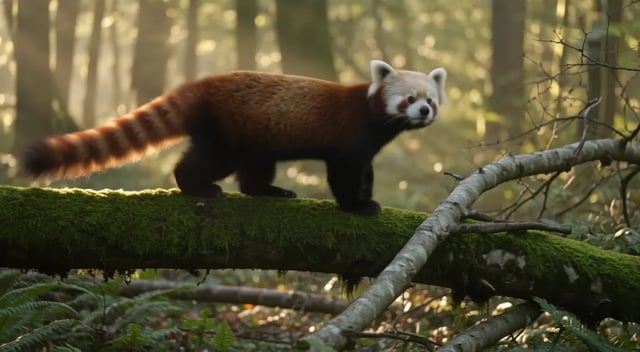
FLUX 3 Max text to video — a red panda walking along a mossy log in morning light

Dialogue and sound written into the prompt

Put the spoken line in quotes, name who says it, and describe the room tone or music. FLUX 3 Max renders the voice, the ambience, and the picture together, so a talking scene arrives with its audio already in sync. Turn audio off in settings when you only need the picture.

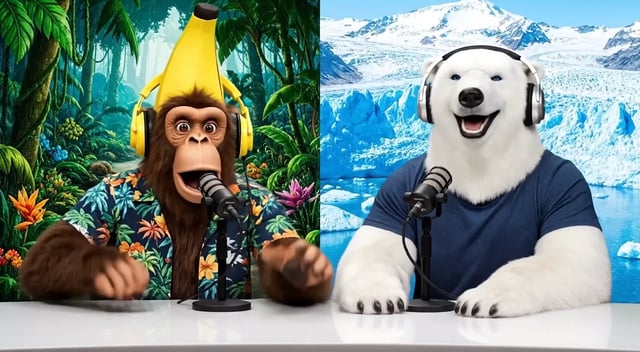
FLUX 3 Max image to video with dialogue — a monkey and a polar bear hosting a talk show

Start from a photo, end where you choose

Image to video takes your photo as the first frame and keeps its look, framing, and shape. Add a second image as the last frame when you need the shot to land somewhere specific — a product reveal, a pose, a logo card. The prompt describes how the shot moves between the two.

FLUX 3 Max image to video — slow push-in on a bull rider resting by the fence

Any shape, up to 20 seconds, up to 1080p

Choose 9:16 for Reels and Shorts, 1:1 or 4:3 for feeds, 16:9 or 21:9 for widescreen. Clips run from five to twenty seconds, at 720p for drafts and most social posts or 1080p for the cut you keep. You only pay for the seconds you ask for.

FLUX 3 Max widescreen nature clip rendered at 720p

Which FLUX 3 to pick

FLUX 3 Max vs FLUX 3

Same credits per second. Pick by what the shot needs.

This page FLUX 3 Max Fast, prompt-faithful Use FLUX 3 Max
Video hub FLUX 3 Storyboards & video edit Open FLUX 3
Time for a 10-second clip About 12 seconds of model time About 2 minutes of model time
Start from Text, or one photo plus an optional last frame Text, or 1–10 photos as a storyboard
Edit an existing clip No Yes, with FLUX 3 Video Edit
Audio Native, on by default Native, on by default
Length and resolution 5–20s, 720p or 1080p 5–20s, 720p or 1080p
Credits per second 35 at 720p, 60 at 1080p 35 at 720p, 60 at 1080p
How it works

How to use FLUX 3 Max in four steps

From a sentence or a photo to a finished clip with sound.

  1. 1
    Describe the shot

    Describe the shot

    Write one continuous scene: who is in it, what happens, how the camera moves, and what we hear. Put spoken lines in quotes.

  2. 2
    Add a start frame (optional)

    Add a start frame (optional)

    For image to video, upload the photo that opens the clip. Add a last frame if the shot must end on a specific image.

  3. 3
    Set length, size, and shape

    Set length, size, and shape

    Pick five to twenty seconds, 720p or 1080p, and an aspect ratio. The generator shows the credit cost before you start.

  4. 4
    Generate and review

    Generate and review

    Watch the clip in your library, tweak the prompt, and run again. Download the take you like with its audio.

Who it's for

Where FLUX 3 Max fits

Jobs where speed and a faithful prompt matter more than anything else.

  • Ad spots with a voiceover

    Write the scene, the tagline, and the narrator's line in one prompt and get a short commercial with the voice already in sync.

  • Vertical social clips

    Generate 9:16 clips for Reels, Shorts, and TikTok fast enough to test several hooks in one sitting.

  • Product reveals

    Start on a packshot and end on a logo card with the start and end frame, so every take lands on the brand.

  • Previz and storyboards

    Turn script beats into moving shots in seconds, so the team can agree on camera and pacing before a real shoot.

  • Character moments

    Animate a character still into a short scene with a spoken line, a reaction, and matching room sound.

  • Nature and travel b-roll

    Fill a timeline with natural-looking motion and ambient sound — wildlife, weather, city streets — at 720p or 1080p.

FLUX 3 Max questions

What is FLUX 3 Max?

FLUX 3 Max is a post-trained version of Black Forest Labs' FLUX 3 video model. It follows prompts more closely, looks sharper, and renders much faster than FLUX 3, and it makes video with synchronized audio from text or from a photo.

How is FLUX 3 Max different from FLUX 3?

FLUX 3 Max is about ten times faster — roughly 12 seconds of model time for a 10-second clip versus about two minutes — and ranks above FLUX 3 in published image-to-video quality tests. FLUX 3 still covers jobs Max does not: storyboards with up to ten photos and editing an existing clip with FLUX 3 Video Edit.

How fast is FLUX 3 Max on this site?

The model itself needs about 12 seconds for a 10-second 720p clip. On top of that come a short queue and saving the finished file to your library, so the total wait is a little longer than the model time. Longer and 1080p clips take more time.

Does FLUX 3 Max generate audio?

Yes. Audio is on by default: describe dialogue, music, and ambient sound in the prompt and they come back in sync with the picture. Put spoken lines in quotes and say who speaks them. You can switch audio off in the settings.

Can I set a start and end frame?

Yes, in image to video. The photo you upload becomes the first frame; add a second image as the last frame and FLUX 3 Max moves the shot from one to the other following your prompt.

How long and how large can FLUX 3 Max clips be?

Five to twenty seconds, at 720p or 1080p. Aspect ratios run from vertical 9:16 and 3:4 through 1:1 and 4:3 to 16:9, 2:1, and 21:9. In image to video the frame follows your photo.

How many credits does FLUX 3 Max cost?

FLUX 3 Max costs 35 credits per second at 720p and 60 at 1080p — the same as FLUX 3. A five-second 720p clip is 175 credits. The generator shows the exact cost before you start.

Ready to try FLUX 3 Max?

Write a scene or add a photo and get a clip with sound in seconds.